

There’s no getting around it: this game runs on your voice, so a properly working microphone isn’t a nice-to-have — it’s the whole point of the input system. Given that development is still in early access, audio hiccups show up more often than in a finished release, and the developer hasn’t tried to hide that. Below is what to check before playing and what’s known to go wrong.
Don’t buy or dive into a full session blind. Grab the free “No Gameplay Demo” build first and put it through its paces. Doing so answers two questions without any risk to your wallet:
The demo carries over the same customization options and Mic Check as the paid release, so it’s a genuinely useful way to catch trouble early rather than after purchase.
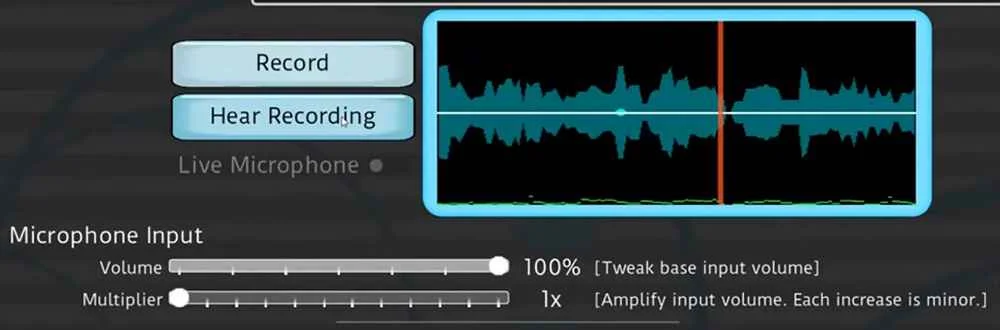
The single most-reported problem: your own voice is audible in real time while speaking, and the waveform display clearly shows activity — yet the recording itself never plays back afterward. The root cause traces to a limitation inside Godot’s AudioEffectRecord component, which the game depends on for capturing audio. Fixing it isn’t within the developer’s control; it hinges on changes being made to the Godot engine itself.
Steps worth trying:
Anyone streaming or recording through OBS has occasionally reported the game crashing mid-session during scene changes. The likely culprit is the Vulkan graphics API. As a fix, a Compatibility build has been available since version 0.4.14 that skips Vulkan entirely — worth switching to if this crash sounds familiar.
Some players setting up local multiplayer have found that changing an individual player’s microphone in that menu has no real effect — the game keeps defaulting to whatever’s chosen in the main settings instead. If audio is crossing over between players during a group session, this mismatch is a likely suspect, so it’s worth confirming each player’s assigned device manually before the match begins.
The audio system here rests on parts of Godot that are still fairly new and actively evolving, which explains why microphone issues crop up more here than in most polished titles. Per the developer, deeper improvements to Godot’s audio and microphone capabilities — things like built-in FFT support or more flexible stream handling — are largely outside their control and depend on progress made to the engine itself. A stubborn audio bug you hit is more likely a known engine constraint than a sign something’s broken on your end.