The Choicer Voicer looks like a simple party game about doing funny voices, but it plays like a build-your-own-show kit that only works once you’ve fed it something to work with. There’s no big campaign waiting inside, no roster of pre-made characters to unlock, and no story to work through before the real game starts.
Instead, this game hands you a judge panel, a studio, a host, and a microphone, then leaves the actual content up to you. That’s the part people don’t expect the first time they open The Choicer Voicer, and it’s the reason this page spends as much time on setup as it does on the studio itself.
Four main formats, including a Twitch-specific variant
What Kind of Game This Actually Is
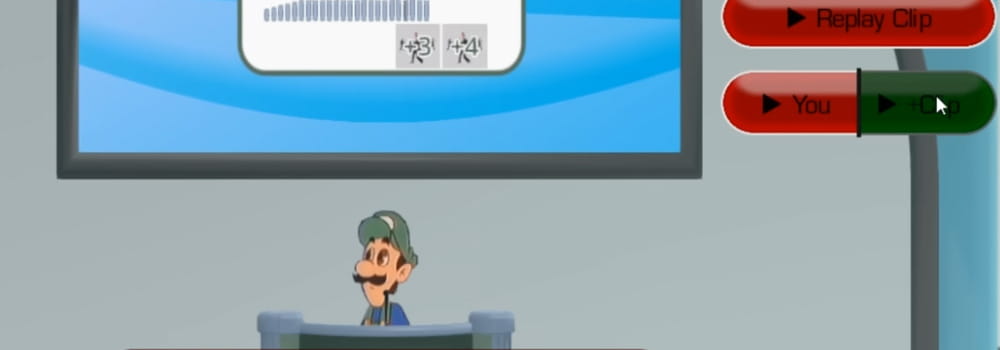
At its core, The Choicer Voicer is a scoring game built around a single question: can you match the audio clip you just heard? A round starts, a clip plays, and you speak into your microphone trying to land the delivery, the timing, or the accent close enough that the judge panel gives you points. Do that across enough rounds and you end the session with a score, the same shape as any other game show, just with your voice as the controller.
What makes The Choicer Voicer different from other party games in this space is how little it assumes about what you’re actually impersonating. There’s no fixed cast of characters built into the base game. Instead, the game is structured so that content packs — folders of audio clips someone assembled — plug into the judge panel and the studio the same way a mod would. Two people running the same copy of the game can end up with completely different sessions depending entirely on what they’ve loaded in.
That structure is also why reviews of the game tend to split so sharply. If you go in expecting a finished product with characters and jokes already written, The Choicer Voicer can feel thin. If you go in treating it as a framework — closer to a karaoke machine than a scripted game — it opens up fast, especially with a group willing to build a pack together before playing.
Most people land on this page for one of two reasons: they just watched a friend or a streamer play a round and want to know what they actually saw, or they already own the game and are stuck on the empty-library problem before they’ve even reached the studio. A performer who likes doing voices for fun will get something very different out of a session than a competitive player chasing the highest score from the judge panel, and both show up in the community around this title. A third type — the person who mainly wants to run The Choicer Voicer for a Twitch audience — cares less about the studio scoring and more about how cleanly chat can vote on a round.
Filling an Empty Content Library
The first real task in The Choicer Voicer isn’t a round of the game at all — it’s building a voice pack. A voice pack is just a folder of audio clips, and dropping files into that folder is genuinely most of the setup. There’s no complicated packaging step or file conversion most players need to worry about; if you have an audio clip you want to imitate, it can usually go straight in.
This is where community vocabulary starts to matter. Players talk about “packs” the way you’d talk about mods for another game — a smiling-friends pack, a musical pack, a meme pack, and so on. Because The Choicer Voicer ships with almost nothing built in, most of what circulates in the community around the game is exactly this: shared packs other players have already assembled, saving newcomers the job of hunting down clips themselves.
Once a pack exists, it slots into every other part of the game. The judge panel reacts to whatever’s in the active pack, the host references it, and the studio scoring pulls its material from the same folder. Early on, this can feel like a lot of setup for a party game, but the tradeoff is that The Choicer Voicer never really runs out of new material as long as someone keeps building.
The Choicer Voicer never really runs out of new material as long as someone keeps building.
Beginners tend to get one thing wrong early on: they load in a single small pack, run through it once, and assume that’s the whole game. A pack with five or six clips runs out of surprises inside one sitting. Players who stick with The Choicer Voicer longer usually keep several packs on hand and rotate between them, which is also the point at which it stops feeling like a novelty and starts feeling like a hobby with its own small library attached.
Inside the Game Show Studio
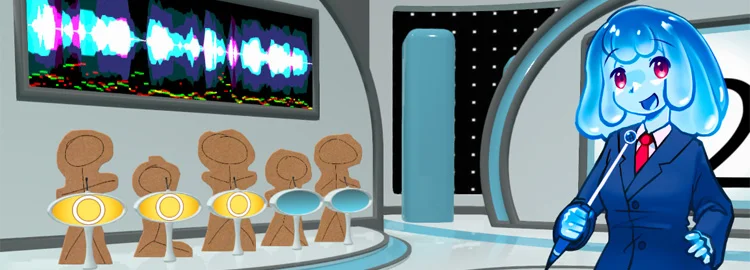
The main way to play The Choicer Voicer is the game show studio, a format built for one to four players in the same room. A judge panel — computer-controlled by default — scores each round, and the studio structure repeats: a clip plays, you deliver your impression, the judges respond, and the game moves to the next round. It’s a loop that plays fine solo, but it noticeably picks up once there are two or more people trading turns and reacting to each other’s attempts.
Because the studio, the host, and the judge panel are all separate pieces the game lets you swap, a single content pack can be replayed with a different presentation and feel like a different session. That’s a deliberate design choice — The Choicer Voicer leans on variety in presentation to make up for the fact that it doesn’t ship with dozens of built-in formats.
By the time you’ve run a handful of rounds, you’ll notice the judge panel isn’t grading on a single fixed standard — accuracy, timing, and delivery all seem to weigh in, even if the exact scoring logic stays behind the curtain. That’s one of the details you only really pick up from playing The Choicer Voicer rather than reading about the studio beforehand, and it’s a big part of why a close vocal match doesn’t always translate into the highest score on the board.
Controls You’ll Need
Because the game is voice-first, the control scheme stays light. Menu navigation, pack selection, and studio setup are handled with the mouse, and the multiplayer screen lets you assign a separate input device to each of the up to four players before a round starts. There’s no complex input layout to memorize — The Choicer Voicer is built around your microphone, not a controller.
Mouse: navigating The Choicer Voicer menus, selecting content packs, choosing judge panel and host options
Microphone input: the primary way you interact with every round in the studio
Per-player mic assignment: set individually on The Choicer Voicer multiplayer setup screen before a session starts
Customizing the Look and Feel
The Customize menu is where The Choicer Voicer separates itself furthest from a typical party game template. Instead of one fixed presentation, the menu’s own aesthetics, the studio backdrop, the judge panel’s look, and the host can all be swapped independently. None of these choices change scoring, but together they change how a session actually feels to play.
This matters more than it sounds like on paper. A group that’s played the same voice pack a dozen times can reset the studio and host through the Customize menu and get something that feels closer to a new game than a repeat session. It’s one of the few places The Choicer Voicer gives you meaningful control without touching the audio content at all.
Some players treat the Customize menu almost as its own hobby inside The Choicer Voicer, building presentation setups the way others build voice packs, then sharing screenshots or combinations with the wider community.
None of the swaps in the Customize menu are purely cosmetic busywork, either. A host that leans deadpan reads the same clip differently than one built for over-the-top reactions, and that shift in tone changes how a round of The Choicer Voicer feels even when the audio content and the scoring haven’t moved at all. It’s a cheap way to reset a stale session without touching a single voice pack.
Dub Mode Changes the Rules
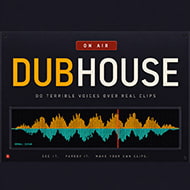
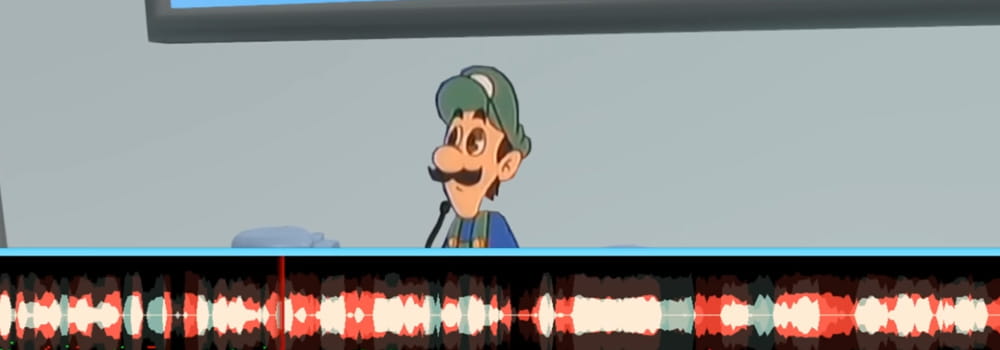
Dub Mode is the one part of The Choicer Voicer that steps away from the scored studio format entirely. Instead of a judge panel grading your delivery round by round, Dub Mode has you record a full voiceover of a scene, matching your own audio to a video clip in real time. There’s no scoring loop here — the goal is closer to producing something you’d actually want to share afterward than winning points.
By the time most players reach Dub Mode, they’ve already built at least one voice pack for the studio, and that experience carries over directly: the same recording setup, the same content-pack folder structure, just aimed at a different output. Players who care about recording quality more than game show scoring tend to spend most of their time in this corner of The Choicer Voicer.
One honest catch reported around Dub Mode is inconsistency between the audio and video syncing depending on setup — some players get clean recordings on the first try, others report the audio landing fine while the video side of a clip fails to play correctly. It’s one of the more divisive corners of The Choicer Voicer precisely because results vary so much from one machine to the next.
Playing for a Twitch Crowd
The streamer-facing side of The Choicer Voicer swaps the computer-controlled judge panel for something built around a live audience. In this variant, a streamer’s Twitch chat reads and reacts to commands, effectively taking over the judging role that the default studio format hands to the game itself. Instead of scoring based on fixed criteria, the outcome depends on what chat decides in the moment.
There’s also a content pack type built specifically for this setup, one that lets viewers vocalize as part of the show themselves rather than just voting from the sidelines. It’s a small but meaningful difference from the base studio format in The Choicer Voicer — the audience isn’t just watching a player perform, they can become part of the performance.
For streamers who already run community-driven segments, this mode tends to fit naturally into an existing show rather than requiring a dedicated stream built around it, since a single round of The Choicer Voicer can slot into a broadcast without needing much setup beyond a loaded content pack.
The Microphone Problem Players Keep Running Into
The most commonly reported issue with The Choicer Voicer isn’t about content or scoring — it’s that microphones sometimes simply don’t record during a session, which can make a round unplayable. This has been tied specifically to surround-sound audio setups, where the underlying engine’s microphone handling doesn’t line up cleanly with certain output configurations.
Players who’ve hit this have generally found a workaround rather than a fix: routing the game’s audio output through a virtual device, then monitoring that output externally so the recording still registers correctly. It’s not a built-in solution, and it’s not something every player wants to set up just to get a round of The Choicer Voicer working, which is part of why the issue comes up so often in community discussion.
It’s worth being upfront that this is a genuinely divisive part of the experience. For players on a standard stereo setup, The Choicer Voicer runs without any of this trouble at all. For players on surround-sound configurations, it can be the difference between the game working and not working, and that split shows up constantly whenever the topic comes up among players.
Tips From Players Who’ve Been At This a While
Once you’ve spent a few sessions building packs and running rounds, some patterns start to show up that aren’t obvious from the menus alone. These are the kind of adjustments regulars mention when someone new to The Choicer Voicer asks how to get more out of a session.
Pro Tip
Keep your voice packs for The Choicer Voicer organized by mood rather than by source — a folder split into “loud,” “deadpan,” and “manic” clips makes it much easier to pick material on the fly during a live session.
Pro Tip
If you’re running The Choicer Voicer game show studio with a group, rotate who picks the active content pack each round instead of sticking with one person’s folder all night — it keeps the judge panel’s reactions from feeling repetitive.
Pro Tip
Test Dub Mode with a short clip before committing to a longer scene in The Choicer Voicer. Sync issues are easier to catch and fix on a fifteen-second clip than after recording several minutes of dialogue.
Pro Tip
If your setup includes surround sound and you haven’t had recording problems in The Choicer Voicer yet, set up the virtual audio routing workaround before you need it, not after a session gets interrupted.
Pro Tip
For The Choicer Voicer’s Twitch variant, warn chat ahead of time about how the voting commands work. A confused audience produces messier rounds than a genuinely tough judge panel would.
You May Be Interested
Gameplay — a full breakdown of how a round actually works, from the clip playing to the judges’ verdict, plus every way you can play: solo, local multiplayer, Twitch, or Dub Mode.
Creating Voice Packs — how to build your first content pack from scratch, where to find community packs, and the folder structure the game expects.
Microphone Setup — a checklist for testing your mic before a session, plus the most commonly reported audio bug and what to try first.
Audio & Microphone Troubleshooting — a deeper technical look at why recordings sometimes come back silent, including the unofficial 0.5.2-dev2 test build some players say fixes it.
Voice Pack Structure — the full map of every content pack folder in the game and the filename rules that make each pack type load correctly.
Audio Clips — supported formats, length limits for voice clips versus Dub Mode samples, and why normalizing volume matters for scoring.
Voice Pack Images — sizing and filename rules for contestant portraits, judge images, and podium graphics, since nothing in the game auto-scales.
Dub Mode — how the scoring-free voiceover mode differs from the main studio, what a dub pack needs, and the known sync issues to expect.
Custom Hosts — what’s officially confirmed about host packs, the one pack type that still doesn’t have a dedicated developer guide.
Frequently Asked Questions
How do I get content into The Choicer Voicer if it doesn’t come with much built in?
You build or download a voice pack, which is just a folder of audio clips loaded into the game. Once a pack is active, it feeds the judge panel, the host, and the studio scoring all at once, so The Choicer Voicer effectively runs on whatever content you or the community have assembled.
Can I play The Choicer Voicer with people who aren’t in the same room?
The main game show studio is built for up to four players locally rather than online multiplayer, but the Twitch-facing variant lets a streamer’s chat take part remotely by voting through commands. That’s currently the closest thing The Choicer Voicer has to a shared session across separate locations.
Why isn’t my microphone recording in The Choicer Voicer?
In The Choicer Voicer, this is most commonly linked to surround-sound audio setups conflicting with how the engine handles microphone input. The workaround players use is routing the game’s audio output through a virtual device and monitoring it externally, since there’s no built-in fix as of the current build.
Is the microphone bug something wrong with my PC, or a known issue?
It’s a known, documented limitation, not something specific to your setup. The game is built on the Godot engine, and the developer has traced the problem to how Godot’s audio recording component handles surround-sound configurations — a limitation outside the developer’s direct control. Testing the free demo’s Mic Check tool before a real session is the best way to catch it early, and an unofficial test build has fixed the issue for some players with previously non-functioning microphones.
Can I use a regular voice pack in Dub Mode?
No — Dub Mode requires a dedicated dub pack rather than a standard voice pack. A dub pack pairs timestamped audio samples with a video file so your recording can be synced and played back over the scene, which a regular pack of standalone clips isn’t structured to do.
How long can an audio clip be?
It depends on what it’s for. A standard voice pack clip can run up to 60 seconds, while a Dub Mode sample needs to stay under 6 seconds to keep in sync with short bursts of on-screen speech. Worth knowing: the game doesn’t check these limits when you select a pack — only when it builds a batch for gameplay — so an oversized clip can look fine in the list right up until it’s actually used.
What size should contestant and judge images be?
None of the character images in The Choicer Voicer are automatically scaled, so the size you export is the size you get in-game. A good target is around 500 by 1000 pixels, exported as PNG so the background stays transparent against the studio. A contestant image must be named “player,” and judge images must be named “judge1” through “judge5.”
Is there an official guide for building a custom host?
Not yet. Unlike voice, dub, judge, studio, contestant, and chatter packs, host packs don’t have a dedicated developer guide as of this writing. What is confirmed is that host packs use a dialog configuration tied to game events, so building one currently means working from the in-game Customization menu and the patterns other pack types follow, rather than a step-by-step official walkthrough.
None of this is presented as a polished, complete package, and The Choicer Voicer doesn’t pretend otherwise — it’s a studio, a host, a judge panel, and a microphone waiting for you to decide what goes into Dub Mode next. Whether that’s exciting or exhausting depends entirely on whether you’re willing to build the first voice pack yourself before anyone presses record.
Our site uses cookies to personalize and customize ads. You can change your settings and disable unnecessary cookies at any time you want.